
Kiddom
July 30, 2026


Grade Student Work Without the Late-Night Data Entry
It is 9 p.m., and Ms. Rivera is at her kitchen table with a stack of second-grade math classwork, tackling today’s lesson: making equal groups, or arrays. How many counters are in each row, how many rows are there, and how many in all? The kids did the work hours ago. Now she is doing hers. Reading each page, marking it, then opening the gradebook and typing the scores in, one student at a time. Adding thoughtful feedback takes all the longer.
She teaches in a district that recently pulled way back on screen time for the youngest grades. So the work is on paper, which is right for six- and seven-year-olds. But every page of the paper brings more student data that never makes it into Kiddom. The scores live in her head and in the stack of papers by the toaster. By the time she enters them, it is late, and all she can see is a column of numbers. Not who is stuck. Not who is ready to move on.
This was never a grading problem. It was a visibility problem.
Paper becomes data, without the paperwork
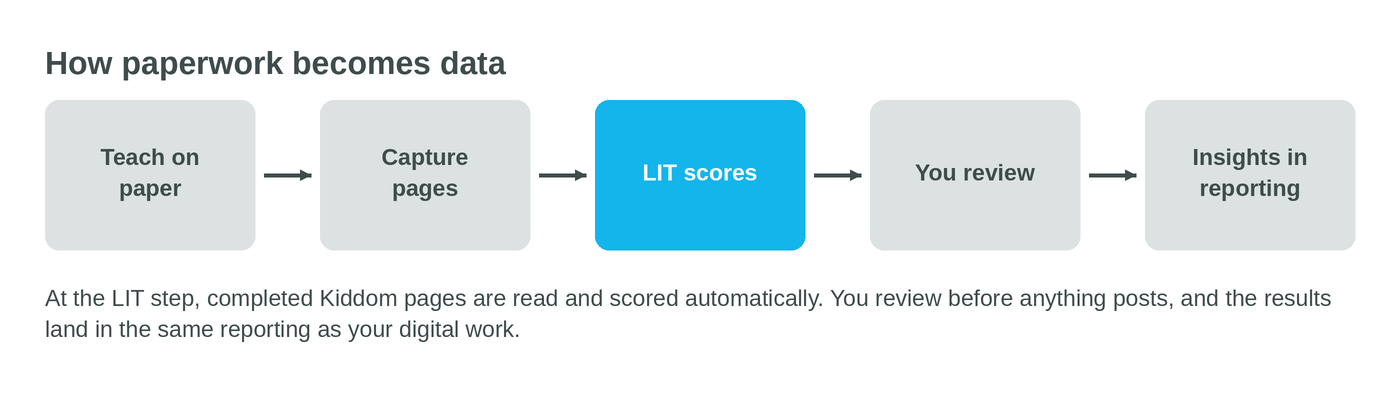
Paper Score reads completed Kiddom pages, scores them, and records the results inside Kiddom. You snap a photo of the finished pages, upload them, and Learning Intelligence Technology reads each student's answers, grades them, and surfaces the results to review and post alongside everything else in your class. No retyping. No second gradebook.
So tonight looks different. Ms. Rivera captures the stack from that day's practice page. A minute later, the scores are in Kiddom. The work that used to disappear into a pile is sitting in her class reporting and is already sorted in her gradebook, ready for tomorrow’s instruction. She's not sorting through papers anymore. She's walking in with a plan.

You still have the final say
Here is the part that matters most: Paper Score waits for your sign-off every time.
Every step of the experience keeps you in control. Before anything is finalized, you preview how the scanned pages were matched to your students and fix any that were matched to the wrong name. Grading only begins once you’re ready. Then, at the review step, you review the scores with the scanned page right there, the handwritten answer visible next to each result. LIT handles the questions that can be auto-scored and leaves the open-ended ones for you. You change what you want to change. Then you post. Kiddom does the busywork. You stay the teacher. It’ll even automatically recommend content- and misconception-based feedback for older students using Kiddom.
Use it when the page comes back
The natural moment is the end of a lesson, when the printed practice page or the cool-down comes back in. That is when you most want to know if it landed, and it is exactly when you have the least time to find out.
With the scores in Kiddom, the picture is built for you. You can see the three kids who flipped rows and columns on the array. You can see the table that is ready for the next lesson. You can see which standard the whole class wobbled on, so tomorrow's warm-up almost writes itself. Paper and digital work sit together, so a paper-first classroom finally gets the same view a digital one has always had.
It starts with printed Kiddom Math and EL Education pages in the early grades, the materials that came out of Kiddom in the first place. Paper Score reads handwritten student answers, grades them, and surfaces results for teachers to review and post. Hours of manual grading this back-to-school season, gone.
Learn more at go.kiddom.co/paper-score.