
Kiddom
November 3, 2026


AI feedback for students does the most good when it arrives fast. Research keeps finding that feedback students get sooner does more for their learning than the same feedback delivered later. In most classrooms, feedback arrives late. A student submits practice on Tuesday, and even when feedback is ready, it often waits for a teacher to find time to post it. Meanwhile the class moves on. The student carries the same error into the next lesson, and that lesson builds on the concept they haven't mastered yet, so the gap compounds.
Kiddom Math now closes that gap with AI-Feedback, part of Kiddom's Learning Intelligence Technology. You choose, assignment by assignment, whether question-level feedback reaches students as soon as it's ready after they submit. You can revise or retract any comment afterward, and you still decide when any score is posted.
Hattie and Timperley's landmark review describes feedback as one of the biggest influences on learning. A later meta-analysis of 435 studies by Wisniewski, Zierer, and Hattie found a medium average effect.
When feedback arrives matters too, and so does what it says. Van der Kleij, Feskens, and Eggen pooled 70 results from 40 studies of feedback given to students in computer-based learning. Three of their findings line up with how feedback on submission works in Kiddom Math.
The finding on timing isn't new. Hattie and Timperley's review summarizes an earlier meta-analysis of 53 studies by Kulik and Kulik that found an advantage for immediate over delayed feedback.
The reason is practical. In math, today's lesson builds on yesterday's. A student who reads a comment while the problem is still on the screen can fix the error before it travels into the next lesson. A student who reads it two days later has already moved on to work that depends on the concept they missed.
Until now, AI-Feedback waited for you to post it. Now you can send it to students the moment it's ready. When you assign or edit an eligible lesson or practice assignment, the Options section of the Assign workflow has a switch called Automated feedback. Turn it on, and question-level feedback goes straight to students after they submit.
Your last choice carries forward as the default for the next assignment you create, and you can change it on any assignment. Turn it on for daily practice, and leave it off for a lesson where you want to read every response first. Only the assigning teacher can change it. Co-teachers can see whether it's on.
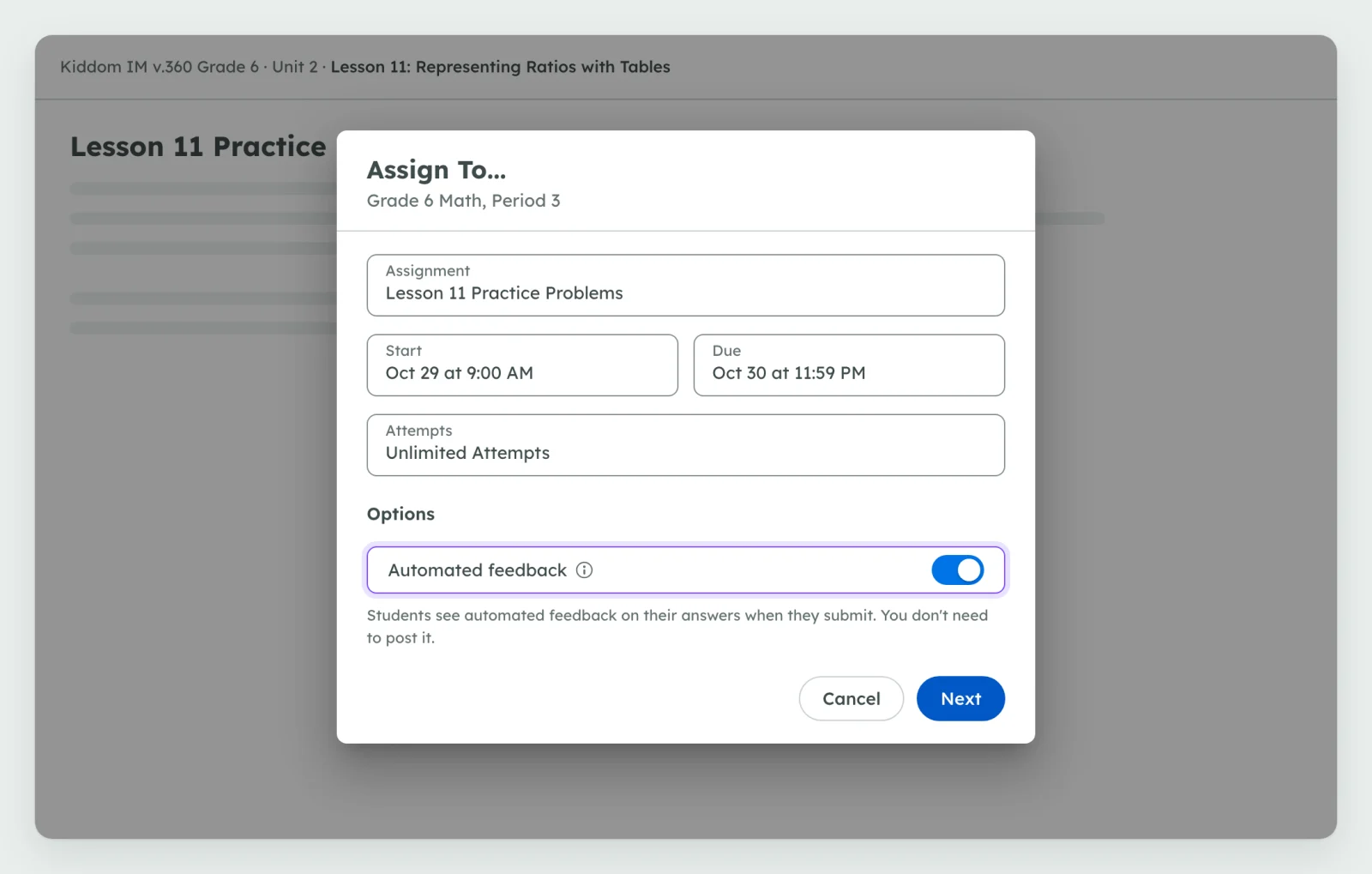
Here is what that looks like in a Grade 6 Kiddom Math lesson. Lesson 11 of the ratios unit, Representing Ratios with Tables, teaches students to organize equivalent ratios in a table. One of its practice problems reads: an orchard produces 3,000 pounds of olives a year, and it takes 20 pounds of olives to make 3 liters of olive oil. How many liters can the orchard make in a year?
The answer is 450 liters. A common partial answer is 150. The student correctly finds that 3,000 pounds is 150 groups of 20 pounds, then stops one step short and treats each group as 1 liter. That student understands more than the wrong number suggests.
When the student submits, AI-Feedback immediately begins analyzing their answers. The comment appears on the same submission page when it's ready, so the student doesn't need to reopen the assignment. The comment names what they got right, points to the missing step, and ends on a question they can answer right away.
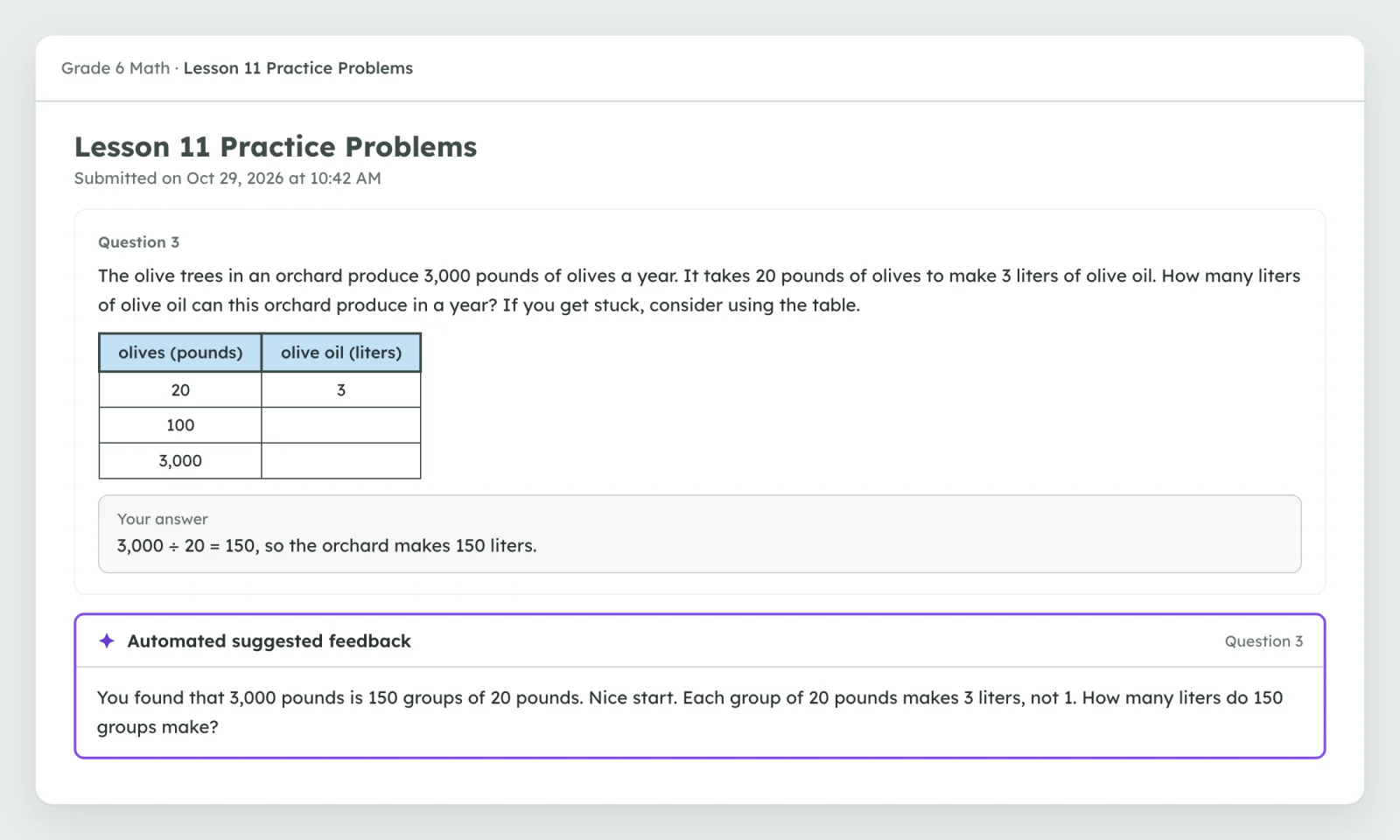
Kiddom also improved how it scores and comments on these answers. Scoring is better at recognizing partial understanding, like the 150 groups above, and suggested scores more closely match how teachers score. The feedback is shorter and more direct, which reflects how teachers provide math feedback in Kiddom.
AI-Feedback considers the assignment details, the learning goals, your preferences, and what the student already knows. That is why the comment above can talk about groups of 20 pounds instead of offering a generic "check your work."
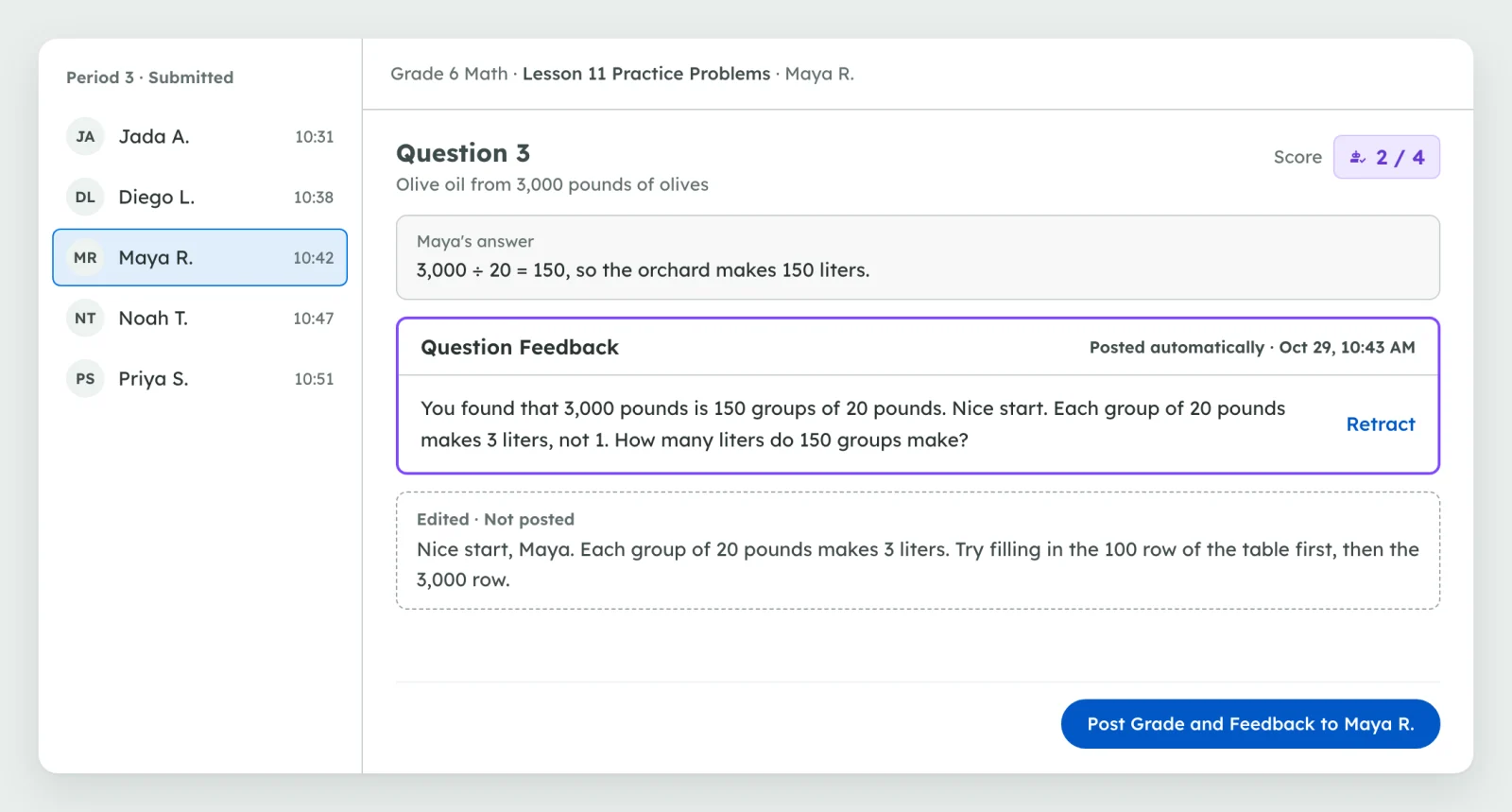
In the grading view, every comment that has gone to students shows its status and the time it was posted, so you can see at a glance what each student has been sent. From there you have three moves.
Scores work the way they always have. A suggested score fills the score box in your view only. Students see a score only after you post it, and you can change it before you do.
A few practices help students turn a fast comment into real progress.
For step-by-step details on turning it on, what students see, and reviewing posted comments, see Kiddom's help guide to AI features.
AI feedback for students is a short comment on a student's answer, drafted by AI, that names what the student got right and what to do next. Research finds it helps most when it arrives soon after the student works, while they still remember their thinking. In Kiddom Math, AI-Feedback drafts question-level comments that consider the assignment details and the learning goals.
In Kiddom Math, only if the teacher chooses that for an assignment. With the feedback option turned on, comments reach students as soon as they're ready after students submit, and the teacher can revise or retract them afterward. With it off, suggested feedback waits in the grading view until the teacher posts it.
Teachers decide which assignments send feedback on submission, see when each comment was posted, and can retract a comment or rewrite it. Edits stay private until the teacher posts them, so students keep seeing the original until then. Scores are never posted without the teacher, and turning the option off stops it for new submissions.
No. In Kiddom Math, a suggested score appears only in the teacher's grading view, and students see a score only after the teacher posts it. Teachers can change any suggested score before posting.
Research generally finds that feedback delivered sooner leads to stronger learning than delayed feedback. A 2015 meta-analysis of computer-based feedback found smaller effects when feedback was delayed and the largest effects when feedback explained the next step. Speed works best alongside quality: a clear, specific comment students can act on right away.
Eligible lesson and practice assignments in supported Kiddom Math curricula, grades 3 through 12, on Written Response, Short Answer, Multiple Choice, and Multiple Select questions. Mid-unit assessments, end-of-unit assessments, and tests are excluded to maintain exam integrity. Teachers turn the option on in the Options section when they assign or edit an assignment.
Yes, when the tool protects student data and keeps teachers in charge. Kiddom states that no personal information is included in its AI features and that nothing teachers or students share is used to train the underlying AI model. In Kiddom Math, teachers choose when feedback reaches students and can retract any comment.
Research and practice
More from Kiddom
Students grow more from feedback that reaches them while they can still use it. Feedback on submission gets a useful next step to them while the problem is fresh, and it takes the posting step off your plate. Whether feedback goes out on submission, what stays, and what counts is still your call.