Kiddom
October 29, 2026


Most advice on AI for differentiation starts with a blank box: paste in a text, pick a reading level, and hope the result still matches what you planned to teach. Teachers using high-quality curriculum have a different starting point. The lesson is already written, sequenced, and aligned. What changes from class to class is who needs extra practice, who needs a hint to get started, who needs the directions in another language, and whether today is a full period at all.
That is the job of Adaptive Lesson Supports in Kiddom Assistant, your personal guide inside every Kiddom lesson. As of October 20, those supports reach every grade, and they now sit together in one menu on the lesson page.
The supports started in kindergarten through second grade. Since October 20, they reach every grade, K–12, in curricula where Kiddom Assistant is available. Generate activity works in math, ELA, and science. Scaffold, Translate, and Clip work in math and ELA. They also replace two older tools, Lesson Clipper and the Practice Problem Generator, so there is one place to look instead of two.
Open any lesson and select + in the Kiddom Assistant bar at the bottom of the page. You will find:
In curricula with Atlas by Kiddom, the same menu leads with Start with Atlas and Atlas insights. If you use a support often, skip the menu: type / in the Assistant and pick a shortcut like /scaffold.
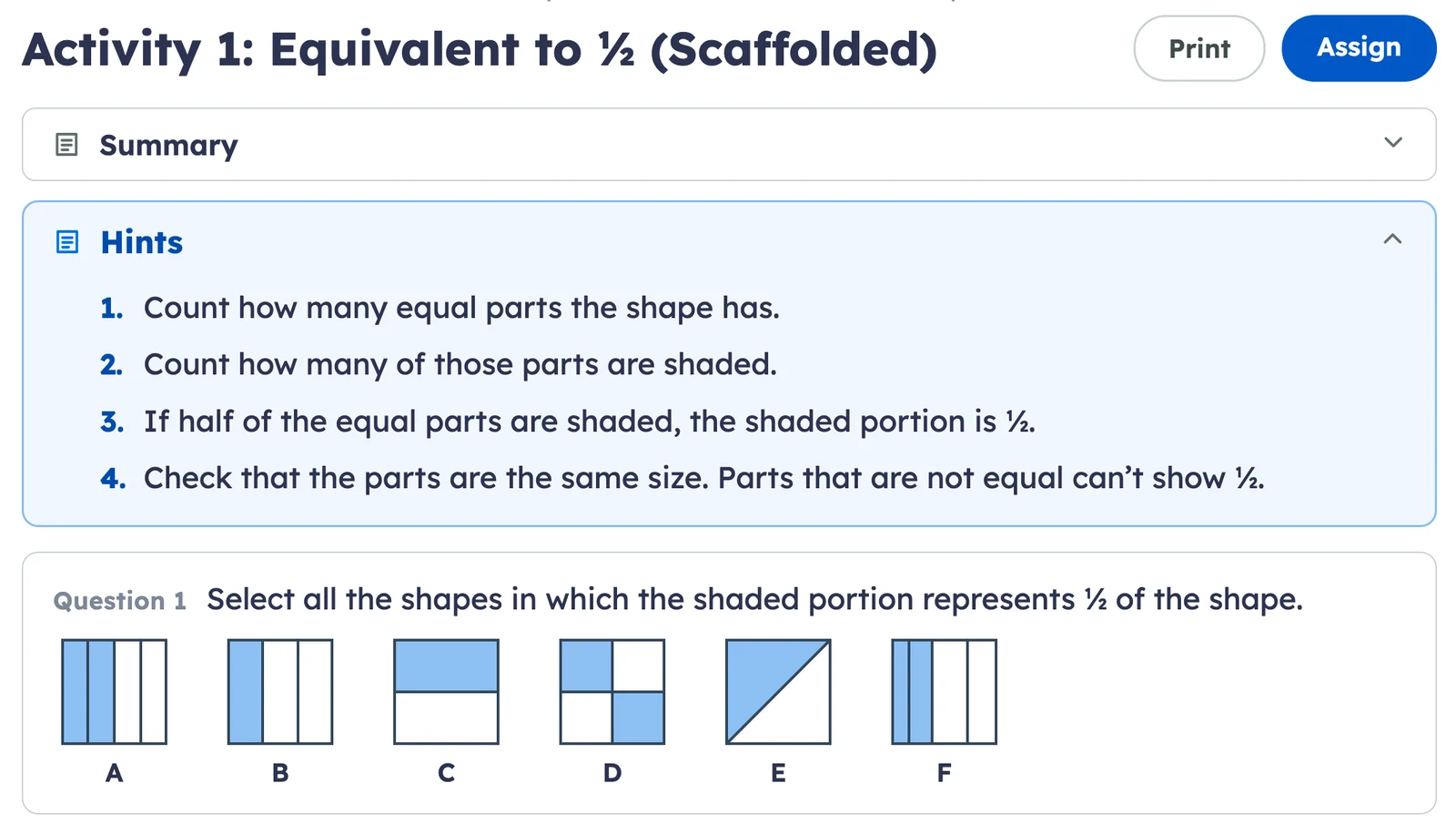
Take Grade 3, Unit 5, Lesson 10: Equivalent Fractions in Kiddom IM® v.360. In Activity 1, students look at shaded shapes and decide which ones show one half. Most of the class dives in. A few freeze, because they are not yet sure what makes a part "a half."
Choose Scaffold activity on Activity 1. The question doesn't change. The scaffolded version adds a short set of hints that walk a student into it.
From the same lesson, Generate activity builds five practice problems at Develop for students who need more reps, or at Deepen for students who are ready for harder questions on the same content. A newcomer in the class can get the activity in Spanish with Translate activity. And if a fire drill eats the period, Clip lesson gives you a 30-minute version of a full lesson.
In EL Education, Powered by Kiddom, Grade 6, Unit 2, Lesson 5, students analyze point of view and theme in Chapter 24 of Two Roads. The Paragraph Planner asks how the chapter develops the theme that "our peers, our school, our families, and our experiences can affirm or threaten our identities."
That is a big question for a student who has the ideas but stalls at the first sentence. Scaffold the Paragraph Planner, and the hints can take the form of sentence frames. The thinking stays with the student.
Paragraph Planner: Two Roads, Chapter 24 (Scaffolded)
Hints
The Text-Dependent Questions for the chapter can go home in Vietnamese or Arabic, so a family can talk through the reading too. When an assembly shortens the block, Clip lesson works on EL Education module lessons, like this one. It doesn't clip Skills Block lessons.
In science, the support available is Generate activity. Scaffold, Translate, and Clip aren't available for Kiddom OpenSciEd lessons. In Grade 8, Unit 8.2 Sound Waves, Lesson 8 asks, "Do we need air to hear sound?" By the end, students have figured out that sound can travel through solids, liquids, and gases, not just air.
After the investigation, open Generate activity and choose Quiz. Set the difficulty level to Apply, the middle of the three levels, which mixes easier and harder questions. Then pick multiple choice and written response as the question types. You get a quick read on who can carry the idea into a new situation, built from the lesson your class just did.
Lesson 8: Do we need air to hear sound? (Quiz, difficulty level: Apply)
Two students are swimming underwater. One taps two rocks together. Can the other student hear it? Use what you figured out about how sound travels to explain your answer.
Each support appears where it fits the curriculum's design.
| Curriculum and grades | Generate | Scaffold | Translate | Clip |
|---|---|---|---|---|
| Kiddom MathK–8 and high school | Yes | Yes | Yes | Yes |
| EL EducationK–8 | Yes | Yes | Yes | Yesmodule lessons only, not Skills Block |
| Kiddom OpenSciEd6–8 and high school | Yes | No | No | No |
Start from the lesson you already teach, then change the way in, not the goal. In Kiddom, Kiddom Assistant's Adaptive Lesson Supports let a teacher generate practice or a quiz at three difficulty levels, scaffold an activity with hints, translate student materials, or clip a lesson to 30 minutes. The teacher reviews each result before students see it.
Adaptive Lesson Supports are four actions in Kiddom Assistant: Generate activity, Scaffold activity, Translate activity, and Clip lesson. They open from the + menu on a lesson in a class curriculum, or from a slash shortcut such as /scaffold. Results save to My Materials beside the lesson.
Every grade, K–12, since October 20, 2026. Kiddom Math (K–8 and high school) and EL Education, Powered by Kiddom (K–8) have all four supports. In EL Education, Clip lesson works on module lessons, not Skills Block. Kiddom OpenSciEd (6–8 and high school) has Generate activity only, and more supports are coming soon.
No. Scaffold activity keeps the original task and adds student supports, shown as hints, that help a student get started. The student still does the thinking the lesson asks for, and the teacher can edit the hints.
Yes. In Kiddom Math and EL Education, Powered by Kiddom, Translate activity translates student materials into Spanish, French, Mandarin, Arabic, or Vietnamese. The translated activity saves to My Materials for that lesson, ready to review, assign, or print.
Both now live in Kiddom Assistant. Clip lesson takes over from Lesson Clipper, and Generate activity takes over from the Practice Problem Generator, now in more grades and subjects. Results save to My Materials on the lesson instead of a separate page.
Research and practice
More from Kiddom
Differentiation works best when every student is still in the same lesson, working toward the same goal. Adaptive Lesson Supports give you more ways to get them there, in the flow of teaching and from the curriculum you already trust, in Kiddom Math, EL Education, Powered by Kiddom, and Kiddom OpenSciEd. You choose what each class needs.