

How Atlas is coherently interwoven into Kiddom IM® v.360

One core math program founded on IM® v.360 and enhanced with Atlas. Here is where everything sits, using one real sixth-grade lesson.
Kiddom logo
Kiddom
September 24, 2026

It is one program, not a set of features

If you are new to Kiddom, start here. Kiddom IM® v.360 is a complete math curriculum, kindergarten through high school. It is built to bring mathematics to life for students and to support you through every step of their journey. From the first warm-up in August to the last cool-down in June, there is no lengthy prep and no complicated rollout.

It is the full Illustrative Mathematics program, rated all green on EdReports in every grade band, delivered ready to teach. That means every lesson arrives whole. The learning goals, the lesson narrative, the standards, the slides, the activities, the cool-down, and the practice problems are already together, in order, in one lesson. You open it and teach it. There is nothing to assemble.

  1. Course6th Grade
  2. Unit 2Introducing Ratios
  3. Section BEquivalent Ratios
  4. Lesson 3Recipes
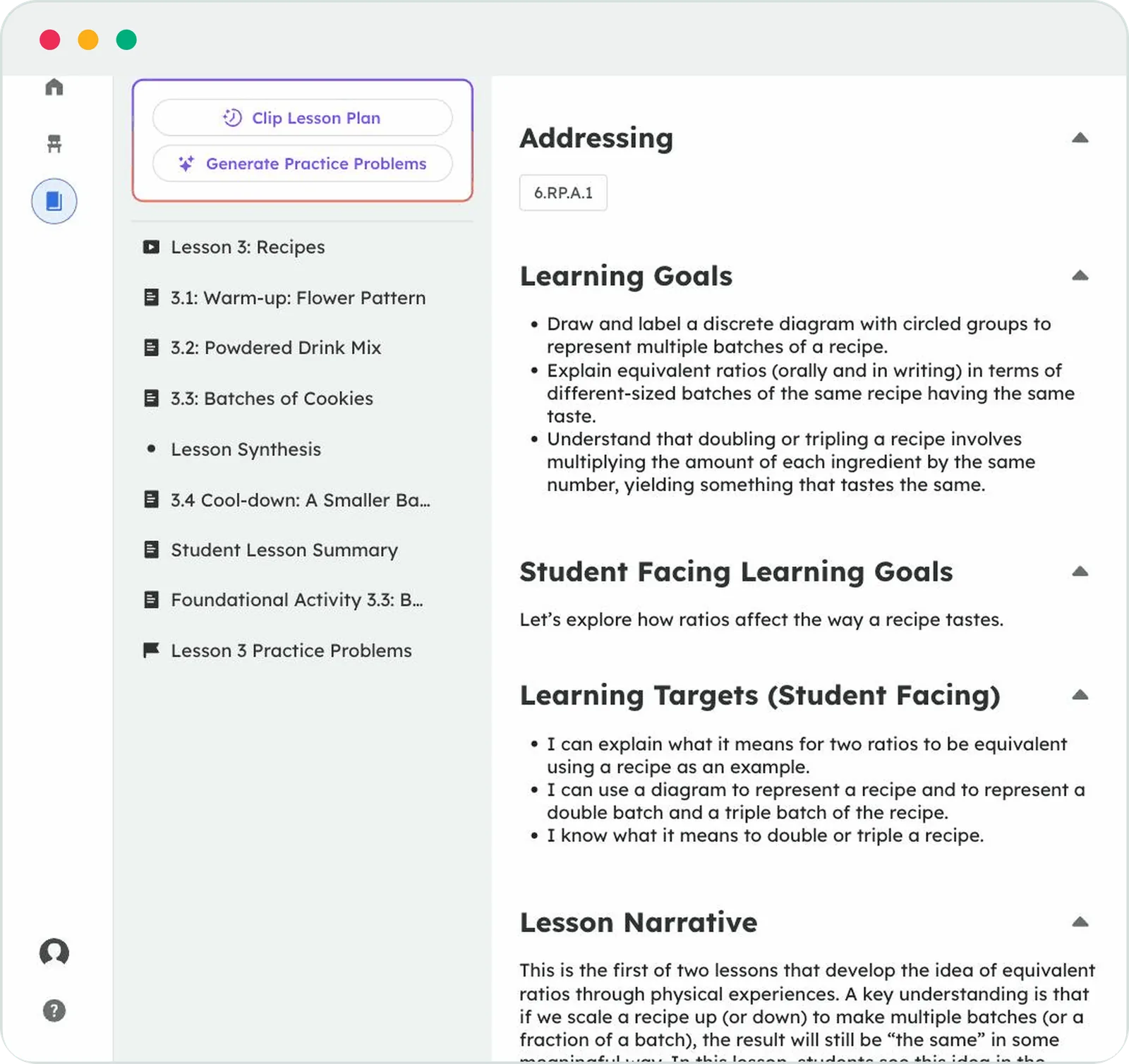
A Kiddom IM v.360 lesson page. The left column lists the lesson parts in order: Warm-up: Flower Pattern, Powdered Drink Mix, Batches of Cookies, Lesson Synthesis, Cool-down: A Smaller Batch of Lemonade, Student Lesson Summary, Foundational Activity 3.3, and Lesson 3 Practice Problems. The main column shows the standard 6.RP.A.1, the learning goals, and the lesson narrative.
Lesson 3 as it appears in Kiddom IM® v.360. The left column is the whole lesson in order: warm-up, two activities, synthesis, cool-down, the student summary, then a Foundational Activity (a more concrete version of Activity 3.3) and the practice problems. The planning notes sit beside it.

Atlas is part of that same program. It is not a separate app to log into. It lives on the lesson page, in an Atlas Activities tab beside the lesson. It works from the cool-down your students already take at the end of the lesson, and it shapes the next lesson from what it finds, inside the same curriculum. The rest of this post walks through one lesson to show you where that happens.

One lesson, four parts, and a loop back to tomorrow

Every Kiddom IM® v.360 lesson follows this same shape. Once you know it, you know every lesson in the program. Here it is, using the Grade 6 lesson above. Choose a part to see what happens there and where Atlas comes in.

45 minutes, from the Lesson Timeline in Grade 6, Unit 2, Lesson 3. Bar widths are to scale.

Before the next class, Atlas closes the loop. Within minutes of the last submission, it reads the cool-down and prepares the next lesson’s Do Now, a set of short Atlas Activities aimed at each misconception, for you to review. Choose Cool-down to see how.

Warm-up, or an Atlas Do Now

In the lesson.A short opener that gets everyone thinking. In Recipes, students look at a flower made of pattern blocks, write ratios about the shapes, and then work out how many of each shape two copies would need. That small act of doubling quietly sets up the whole lesson.

Warm-up: Flower PatternWrite sentences to describe the ratios of the shapes that make up this pattern. How many of each shape would be in two copies of this flower pattern?

Where Atlas comes in.Once your class has taken a cool-down, the next lesson can open with an Atlas Do Now instead. Atlas Activities are those Do Nows: short openers grouped by the misconception the cool-down surfaced, so the students who are still shaky on yesterday’s idea work on exactly that while the students who are ready get a stretch. Then everyone walks into the activities ready for today’s grade-level content.

You see the Do Now before your students do. Edit it, swap it, or keep the curriculum warm-up. Atlas prepares. You decide.
Activities carry the mathematics

In the lesson.One to three activities do the heavy lifting. Recipes has two. First, volunteers taste two drink mixes and the class reasons about which diagrams could describe them. Then students draw two batches, three batches, and five batches of a cookie recipe, and land on a working definition of equivalent ratios.

Each activity comes as three pieces: a launch, the student task, and a synthesis discussion. Supports for multilingual learners and students with disabilities are written into the activities where they apply. In Recipes, the drink-mix activity carries a discussion-support note for multilingual learners and the cookie activity carries an accessibility note, so you are not guessing at what to adjust.

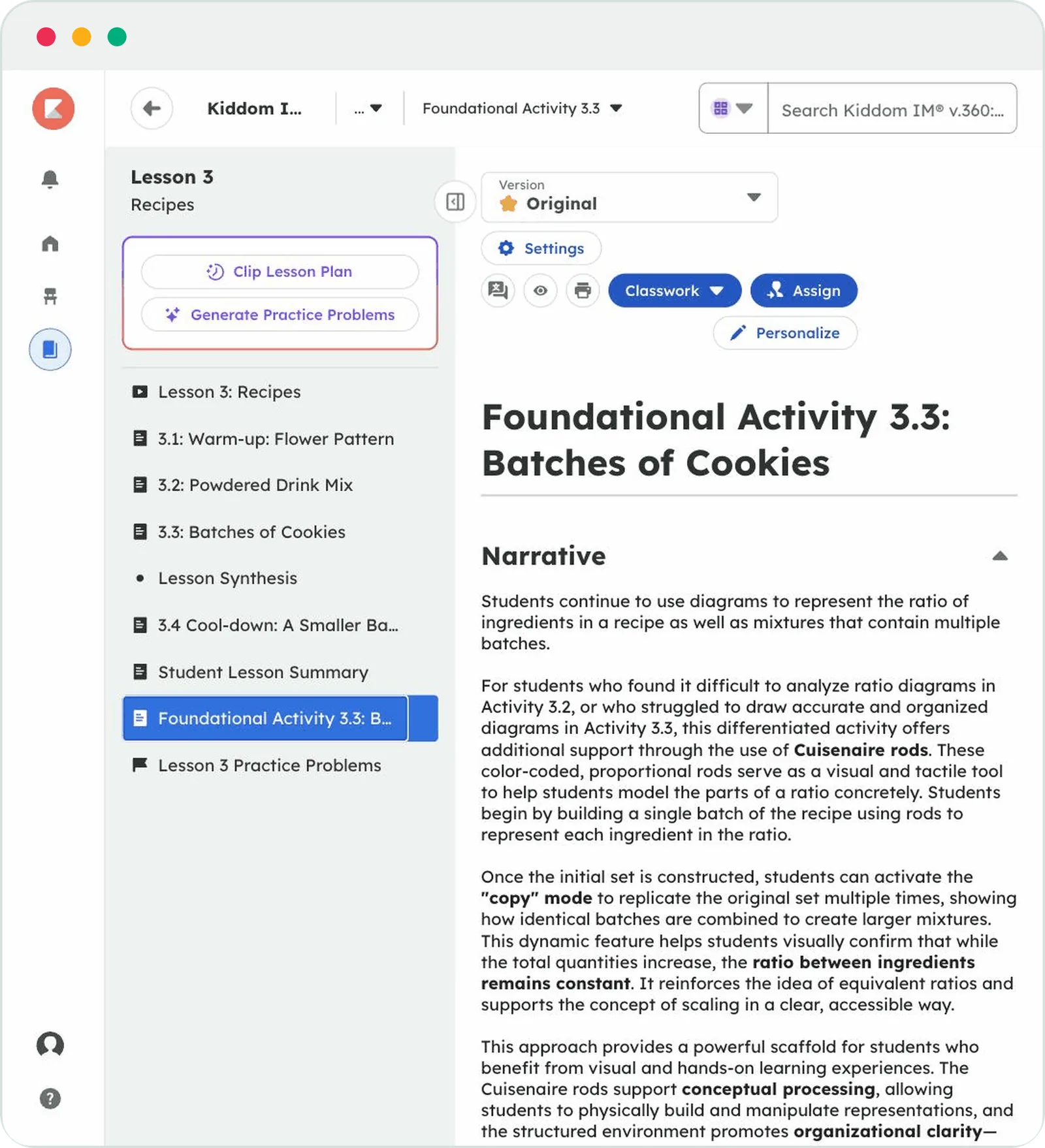
What is already built in.The curriculum includes a Foundational Activity for students who need a more concrete path. In this lesson it is the same cookie problem, worked with Cuisenaire rods. It sits in the lesson sidebar, ready to assign.

Where Atlas comes in.Before this block, not inside it. The activities are where new, grade-level learning happens. Atlas does its work in the Do Now that opens the lesson, so students arrive here ready for today’s content instead of still stuck on yesterday’s.

Lesson Synthesis names what was learned

In the lesson.You bring the class back together and put words to the day. The lesson hands you the questions. When you double a recipe, how does each ingredient change? How do different numbers of batches of the same recipe taste? Students answer, and the idea of equivalent ratios becomes something they said out loud, not something they were told.

Where Atlas comes in.It does not. This is your conversation with your students, and it should be. Atlas does its analysis after the lesson and its preparation before the next one, so this part of the day stays fully yours.

The cool-down shows you who got there

One question at the end of the lesson. Students answer it in Kiddom. With or without Atlas, it is the same cool-down. What changes is what happens to it afterward.

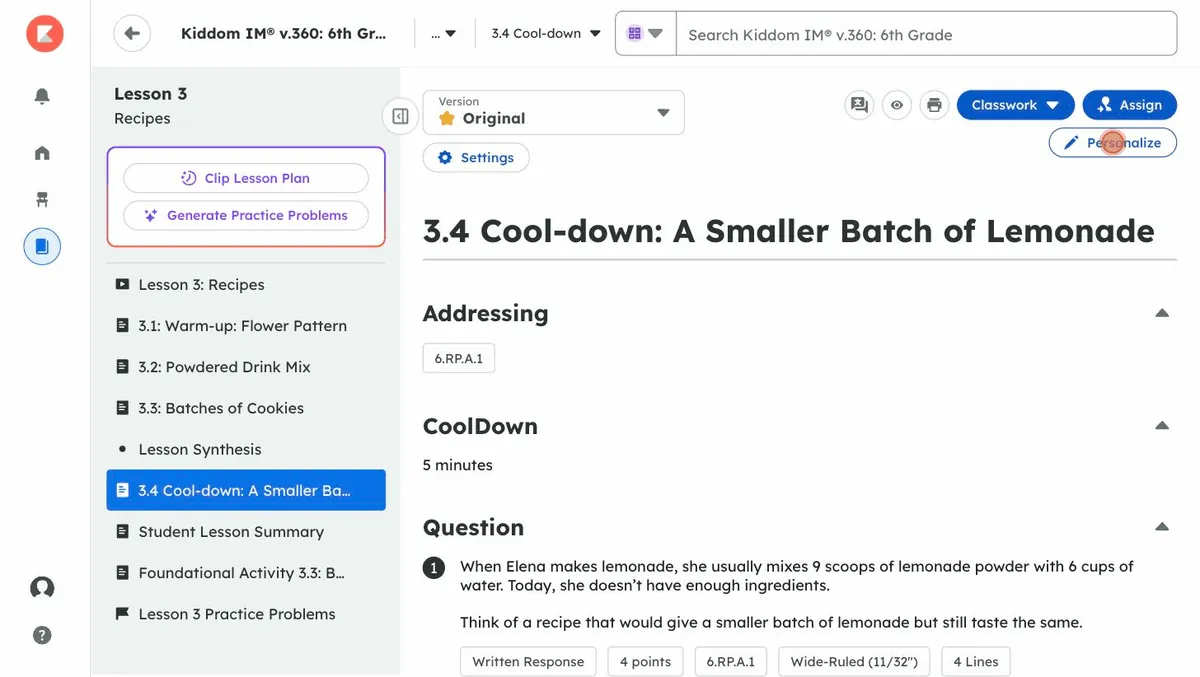
Cool-down: A Smaller Batch of LemonadeWhen Elena makes lemonade, she usually mixes 9 scoops of lemonade powder with 6 cups of water. Today, she doesn’t have enough ingredients. Think of a recipe that would give a smaller batch of lemonade but still taste the same.

After class.Every response in one place, with the lesson’s own guidance on how to respond. For this cool-down, the guidance is that students will meet the idea again soon, so there is no need to slow down.

Personalize when you need to.Before you assign the cool-down, you can make your own version of it for students who need Tier 2 or Tier 3 support. Fewer questions, a read-aloud, a number line to draw on. The original stays as it is. More on that below.

Where Atlas comes in.Students take the same cool-down. Within a few minutes of the last submission, Atlas has read every response and looked past right and wrong to the reasoning underneath. A student who added 1 to both numbers and a student who scaled only one of them got different things wrong, and they need different next steps.

Before the next class, students who share a misconception are grouped together. Each group has a short Atlas Activity aimed at that misunderstanding, with a note that tells you what to listen for and what to ask. Those activities are the next lesson’s Do Now.

What you see before the next class Who needs what, in plain language. The groups and their activities, ready for you to review. Atlas insights from the cool-down also recommend how to personalize learning for individual students. The next section opens a real example.

The analysis that used to happen at your kitchen table now happens inside the curriculum, minutes after the last student finishes, and is waiting for you before the next class.

See what Atlas does with one cool-down

The demo class below has just finished the cool-down for Lesson 10, later in this same ratios unit. Thirty students, one question about equivalent ratios. Here is what you would see a few minutes after class, and what happens when you open one group.

Review the small groups Atlas built, then open one group’s activity and its facilitation note. Group names are from the Atlas demo class; counts follow its review screen.

Differentiation, handled for you or by you

Both paths live in the same program, and both start from the same lesson. They also feed each other: Atlas insights from the cool-down recommend how to personalize learning for particular students, and Personalize is where you make it. Neither one asks you to leave the curriculum.

Let Atlas handle it.Atlas groups students by misconception, not by score. Each group gets a short Do Now activity aimed at that misunderstanding, so they arrive at the day’s new learning ready for it. You can merge groups before the activities are created, and you review every activity before it goes out. Nothing reaches a student until you say so.

This is the path for the ordinary Tuesday, when you want the whole class’s cool-down turned into next steps without spending your evening on it.

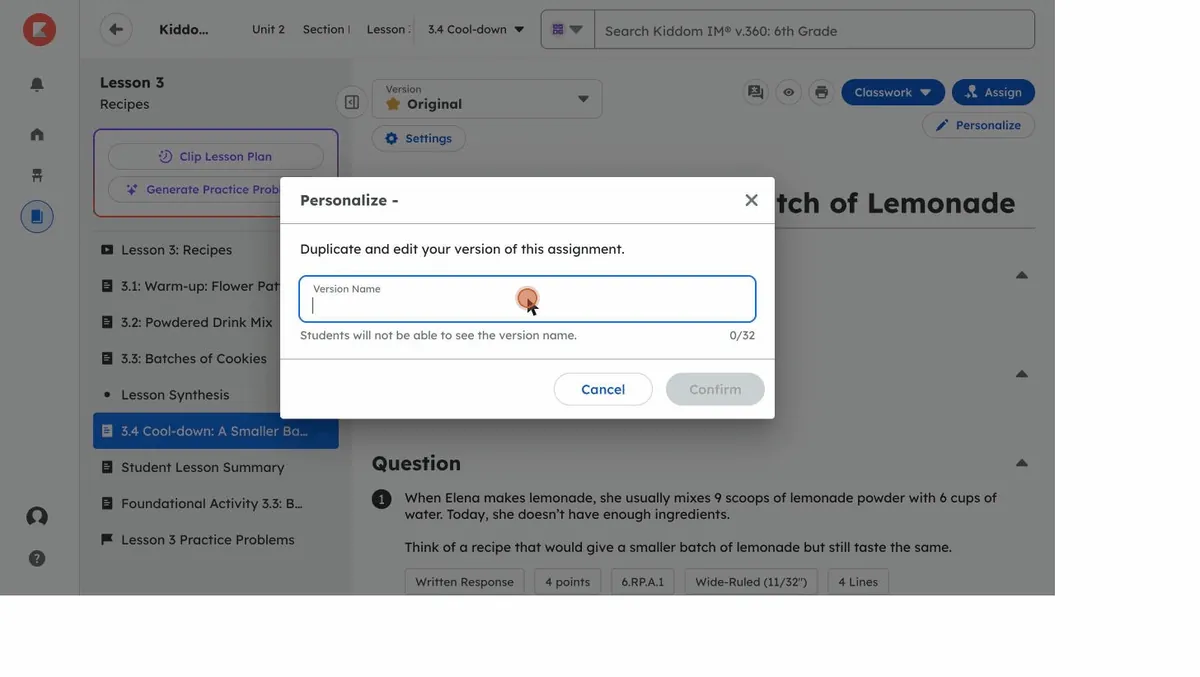
Or do it yourself with Personalize.Open any activity or cool-down and select Personalize. Kiddom makes a new version and keeps the original. Edit or remove questions, change a question type, add audio for students who need read-aloud support, or turn on math tools like number lines and fraction tiles so students can show their thinking. Preview it, then assign it to the students who need it. Here is what that looks like.

This is the path for the student you already know. A version with fewer questions for Tier 2, or a fully reworked one for Tier 3, built from your understanding of that student. The help article Personalizing Assignments walks through every option.

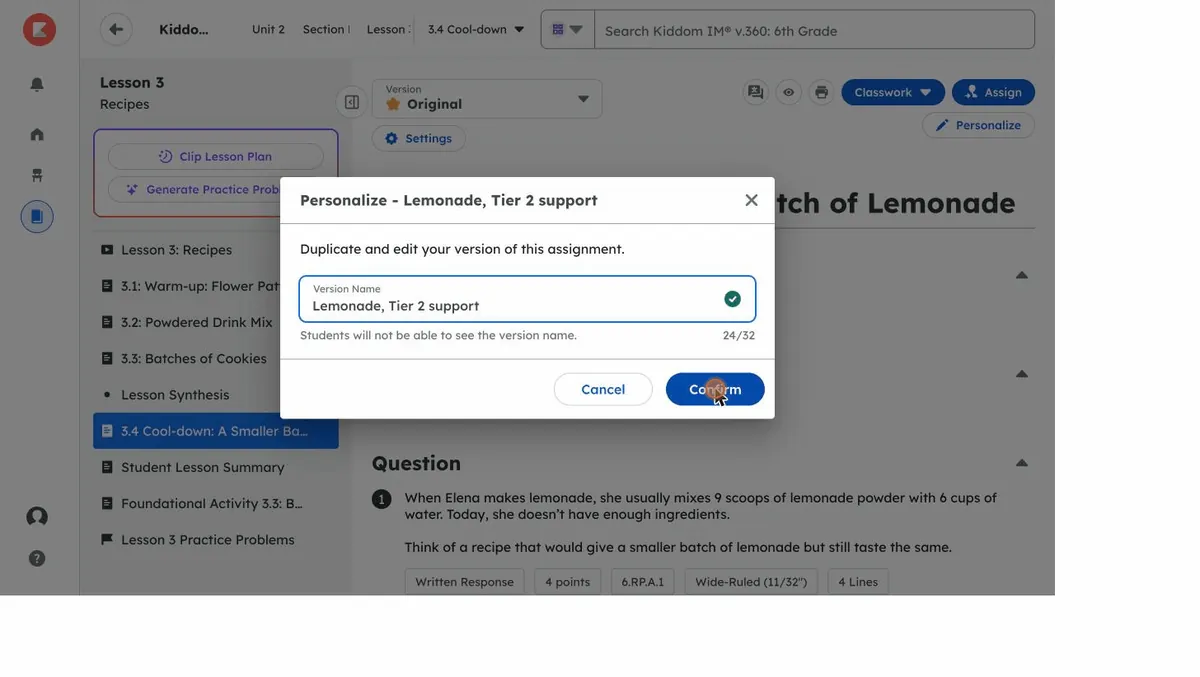
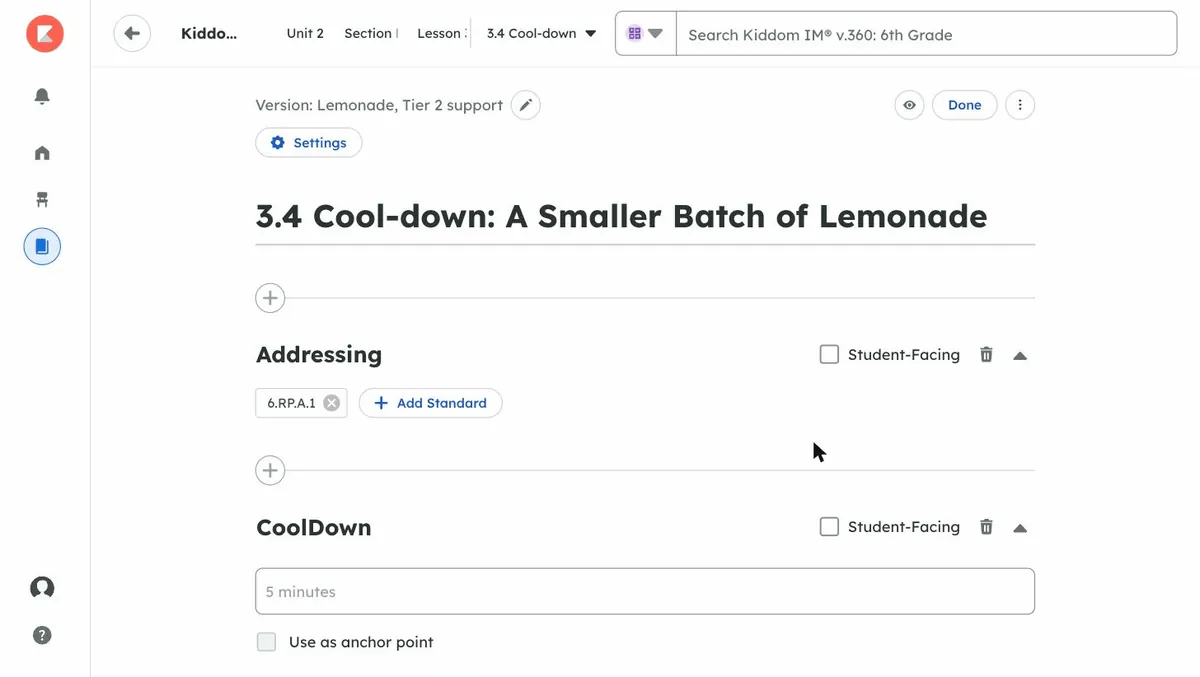
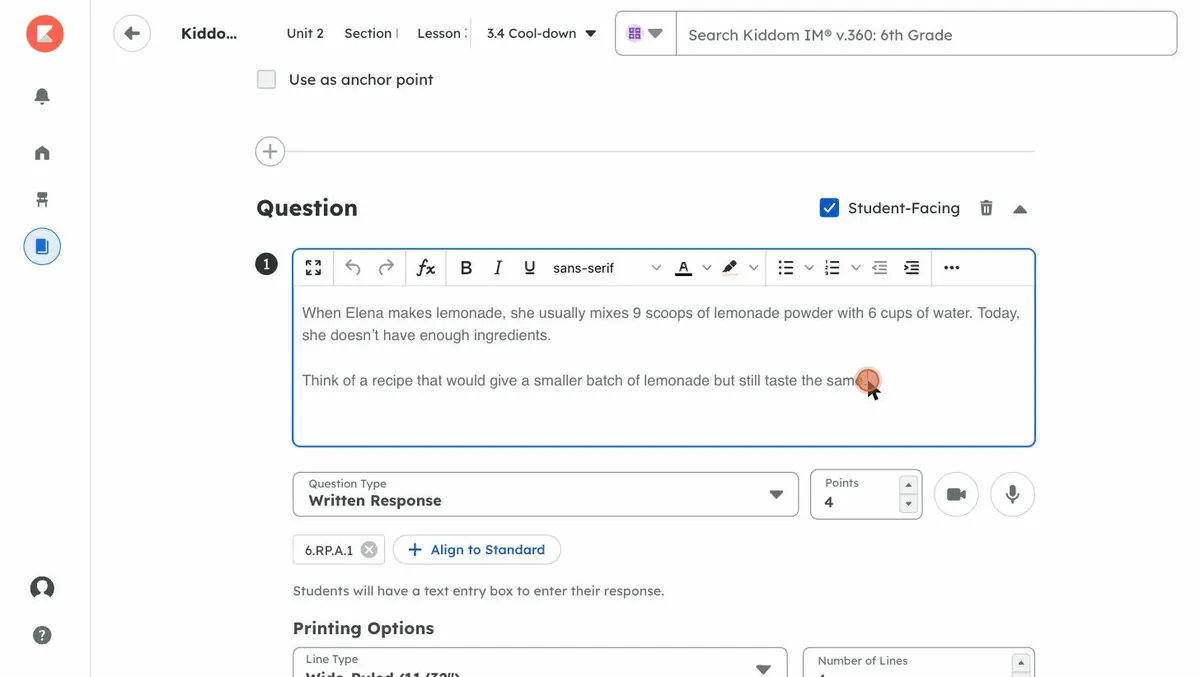
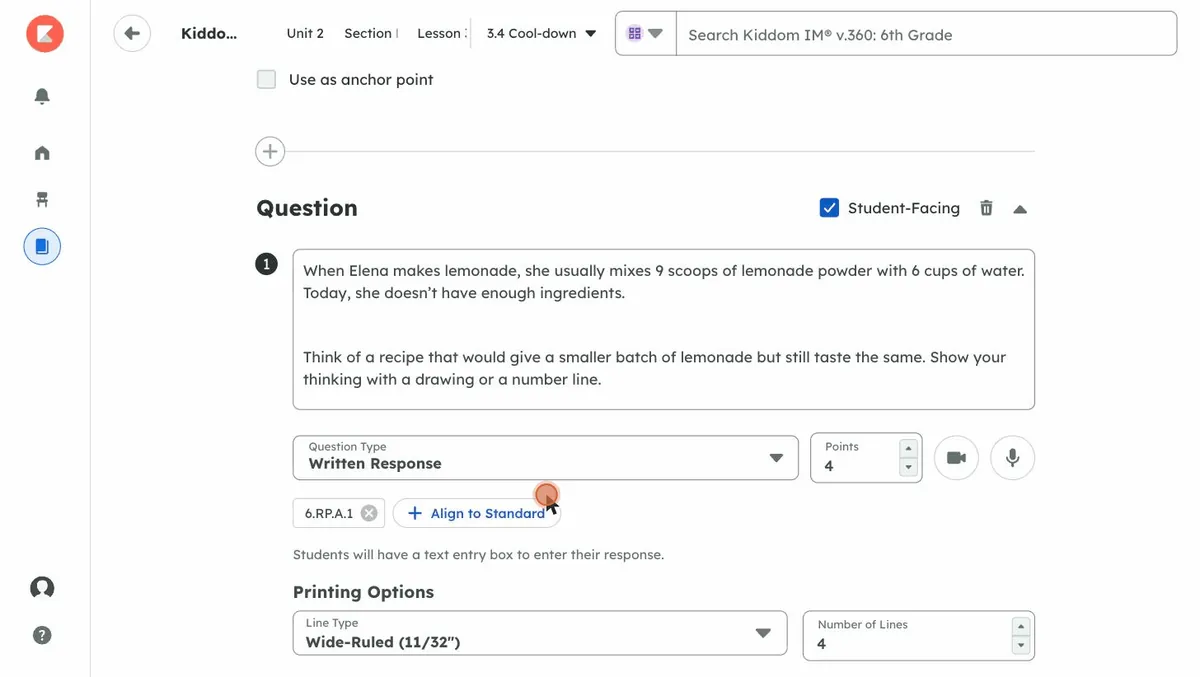
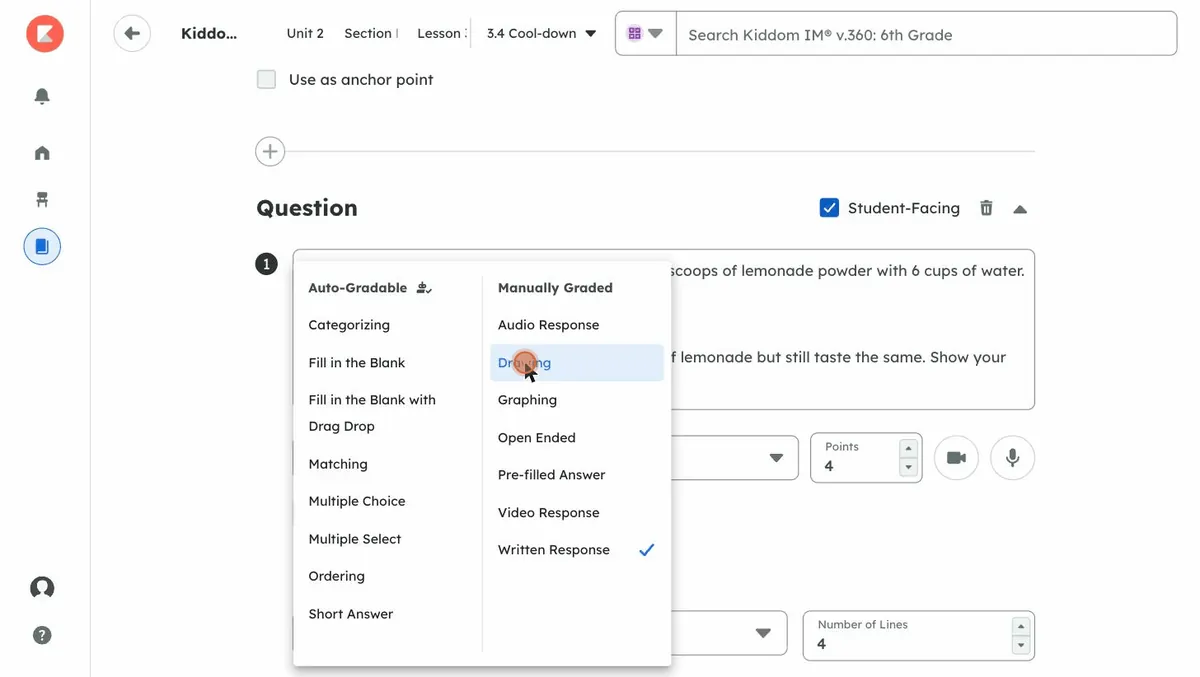
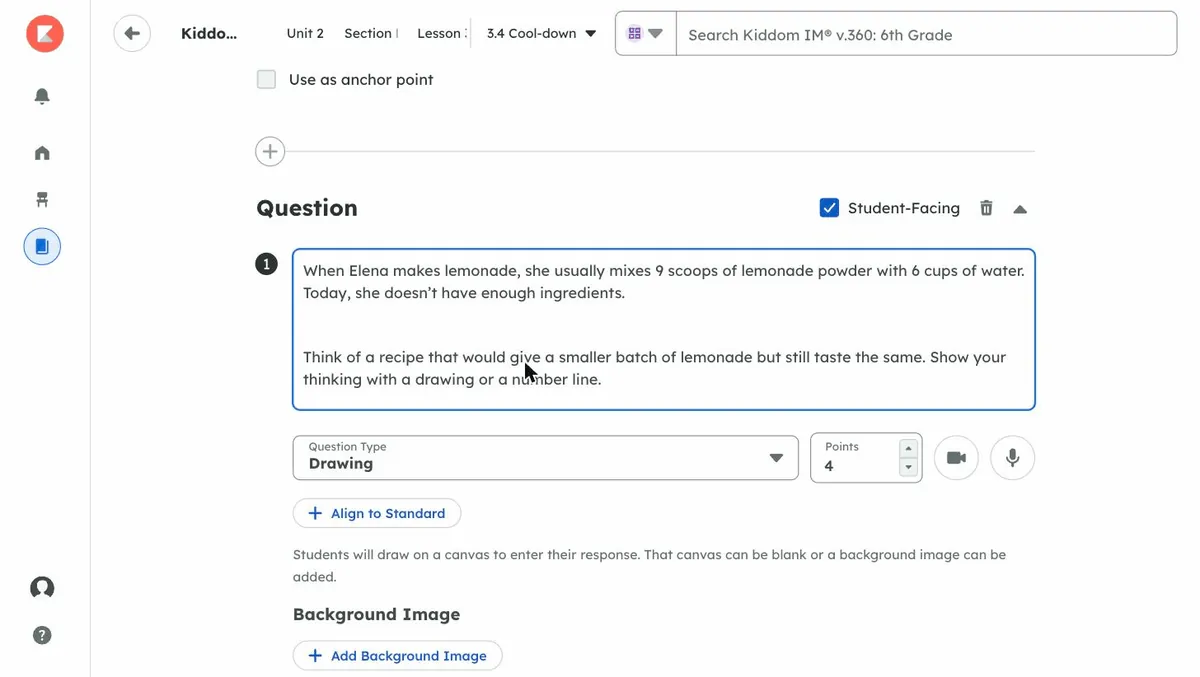
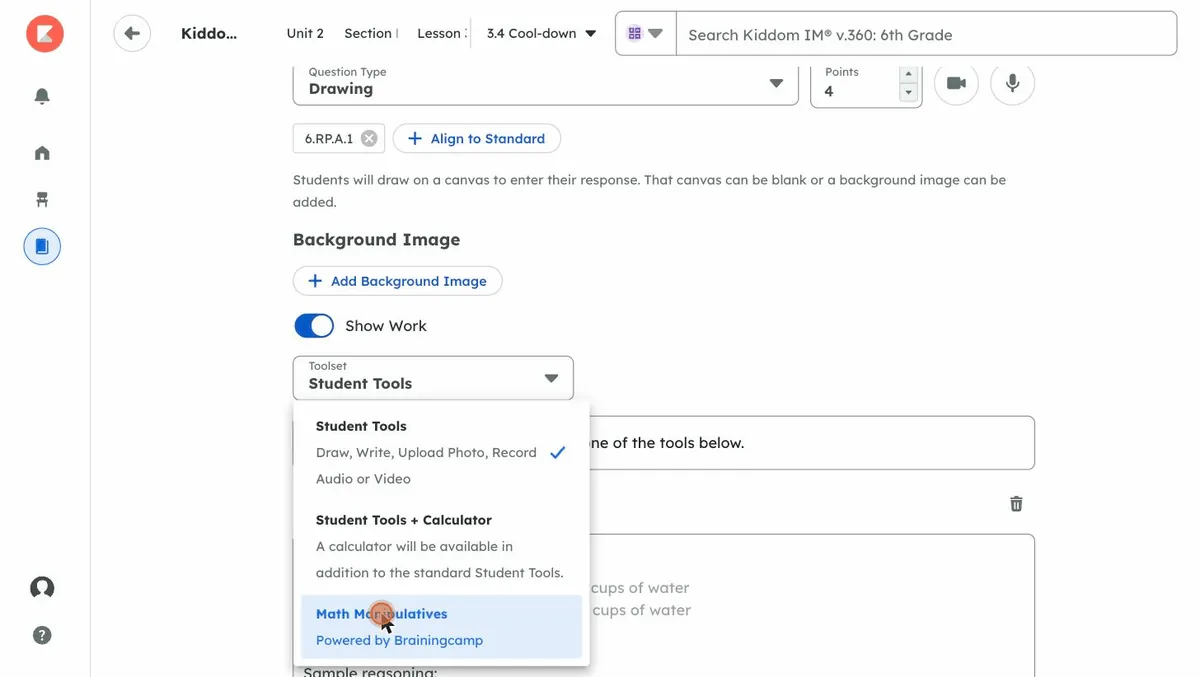
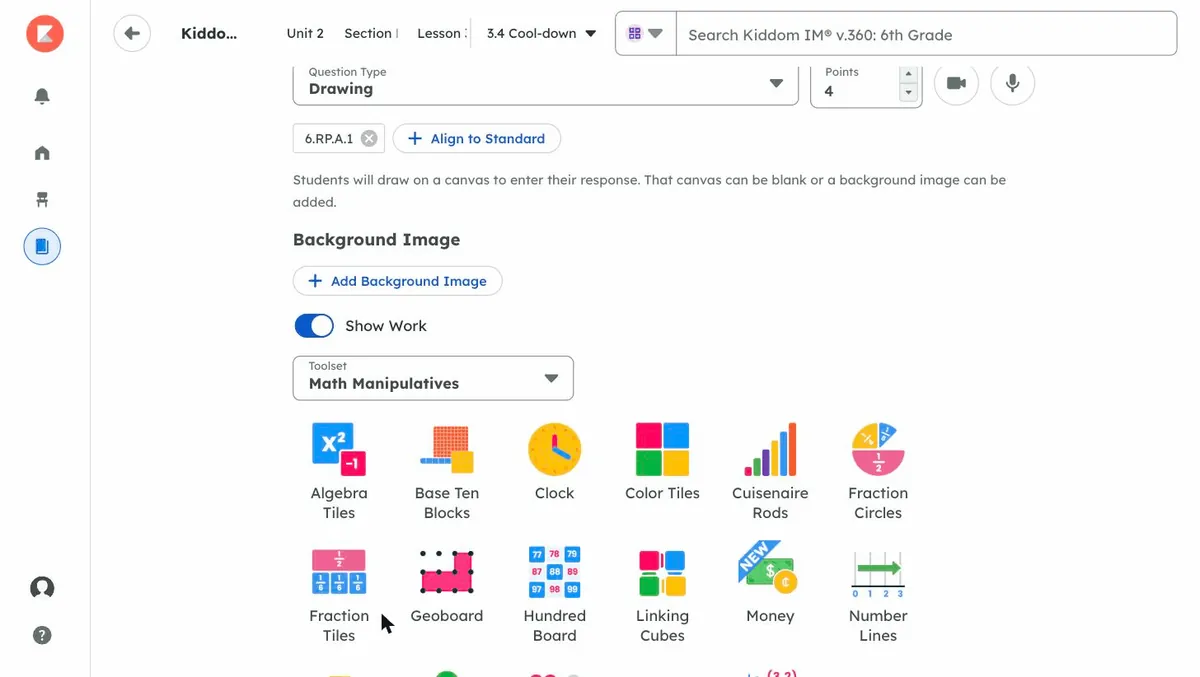
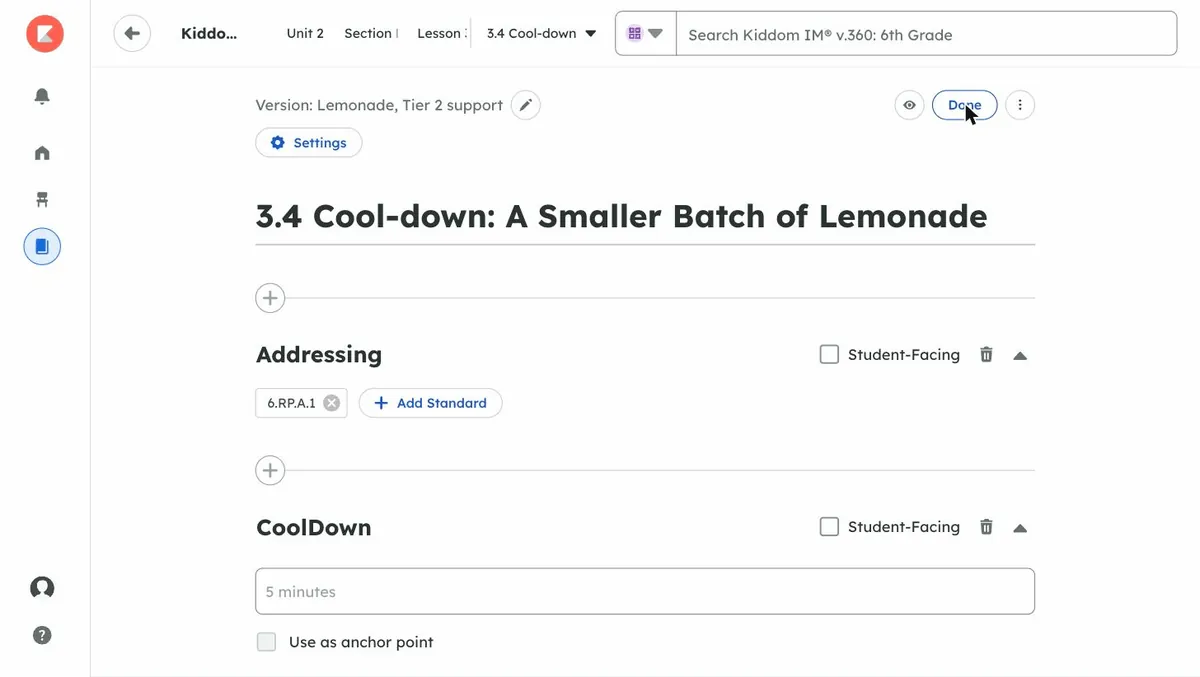
The cool-down page in Kiddom with the Personalize button at the top right. A Personalize dialog reading Duplicate and edit your version of this assignment, with a Version Name field. The version named Lemonade, Tier 2 support, with the Confirm button highlighted. The editor open on the new version, labelled Version: Lemonade, Tier 2 support, with Settings and Done buttons. The cool-down question open in a text editor with a formatting toolbar. The question with a new sentence added: Show your thinking with a drawing or a number line. The Question Type menu is about to open. The Question Type menu, listing auto-gradable types such as Multiple Choice and Matching, and manually graded types such as Drawing and Audio Response. Question Type set to Drawing. Students will draw on a canvas to enter their response. The Show Work toggle on, with a Toolset menu offering Student Tools, Student Tools plus Calculator, and Math Manipulatives. Math Manipulatives selected, showing Algebra Tiles, Base Ten Blocks, Clock, Color Tiles, Cuisenaire Rods, Fraction Circles, Fraction Tiles, Geoboard, Hundred Board, Linking Cubes, Money and Number Lines. Back at the top of the version with the Done button, ready to preview and assign.

1 of 11 Open the cool-down and select Personalize.

Personalizing the Lesson 3 cool-down, recorded in Kiddom. The new version gets a name, a scaffold sentence, a drawing response instead of a text box, and math manipulatives for showing work. The original cool-down does not change.

Some of the differentiation is already written into the lesson. You do not have to build the scaffold before you can use it.

Foundational Activity 3.3: Batches of Cookies in Kiddom. The narrative explains that students who found it difficult to analyze ratio diagrams get additional support through Cuisenaire rods, color-coded proportional rods that make the ratio of ingredients concrete. The same Personalize button appears at the top.
Foundational Activity 3.3 sits in the same lesson as a more concrete route through Activity 3.3. It reworks the cookie problem with Cuisenaire rods for students who need to build the ratio before they draw it.

You can use both. Atlas for the daily rhythm of the class, Personalize for the students whose needs you already know. Either way, the work stays inside the lesson you are teaching.

Why it feels like one program

Because it is one. The curriculum, the cool-down, the analysis, the groups, and the next lesson’s opener all draw on the same lesson, the same standards, and the same view of what each student understands. You do not export anything, translate between tools, or rebuild instruction between lessons. You teach the lesson. The program does the work between lessons and hands it back to you before the next class.

Your judgment still leads every step. You decide what goes to students, when, and how. Atlas prepares. The curriculum holds it all together. Tomorrow’s lesson starts from what today’s cool-down showed.

See it in action